

Adjusting the hinge angle in the iPhone Duo simulator
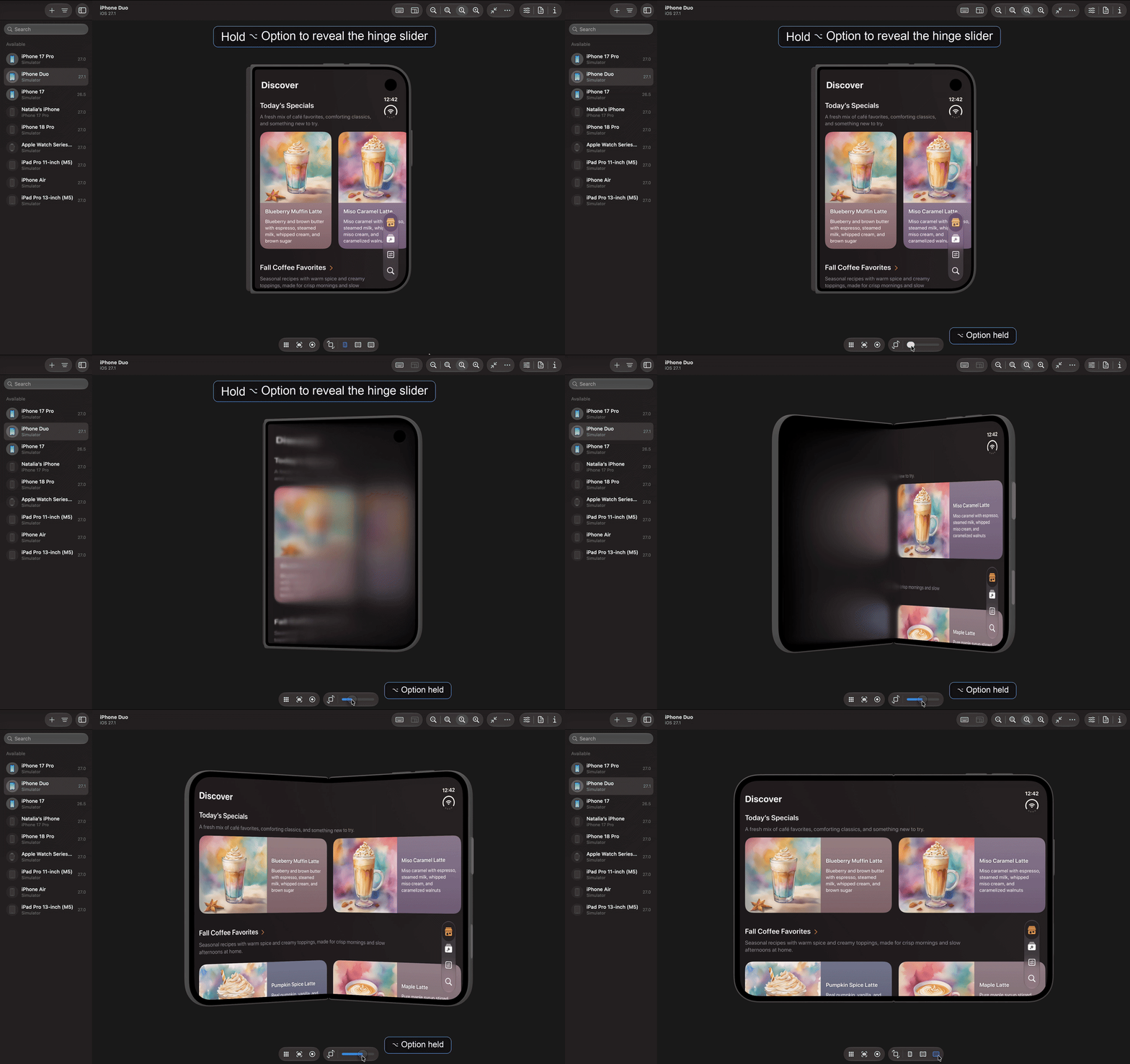
In Xcode 27.1, the iPhone Duo simulator has a slider for controlling the hinge angle, but it isn't visible by default. To reveal it, we need to hold the Option (⌥) key while the simulator is focused.
The slider appears in the controls at the bottom of the simulator window, replacing the buttons for choosing a folded or open position. While holding Option, we can drag the slider to adjust how far the hinge is open. When we release the key, the position buttons reappear.
Work with SwiftUI. Not against it.$35
A field guide to SwiftUI patterns and anti-patterns
The SwiftUI Way
- Avoid common SwiftUI pitfalls
- Build deeper intuition for the framework
- Gain insights from a former SwiftUI Engineer at Apple
Work with SwiftUI. Not against it.
A field guide to SwiftUI patterns and anti-patterns
The SwiftUI Way