

Diagnosing ForEach performance issues in SwiftUI lazy containers
SwiftUI's List and lazy stacks allow us to display large collections by creating view content as it approaches the visible region. However, the way we structure a ForEach inside these containers can cause SwiftUI to evaluate content earlier than expected, adding work for elements whose views are still offscreen.
SwiftUI provides the -LogForEachSlowPath launch argument to help identify these cases when running an app from Xcode. We can enable it by adding -LogForEachSlowPath YES under Run > Arguments > Arguments Passed On Launch in the app's scheme.
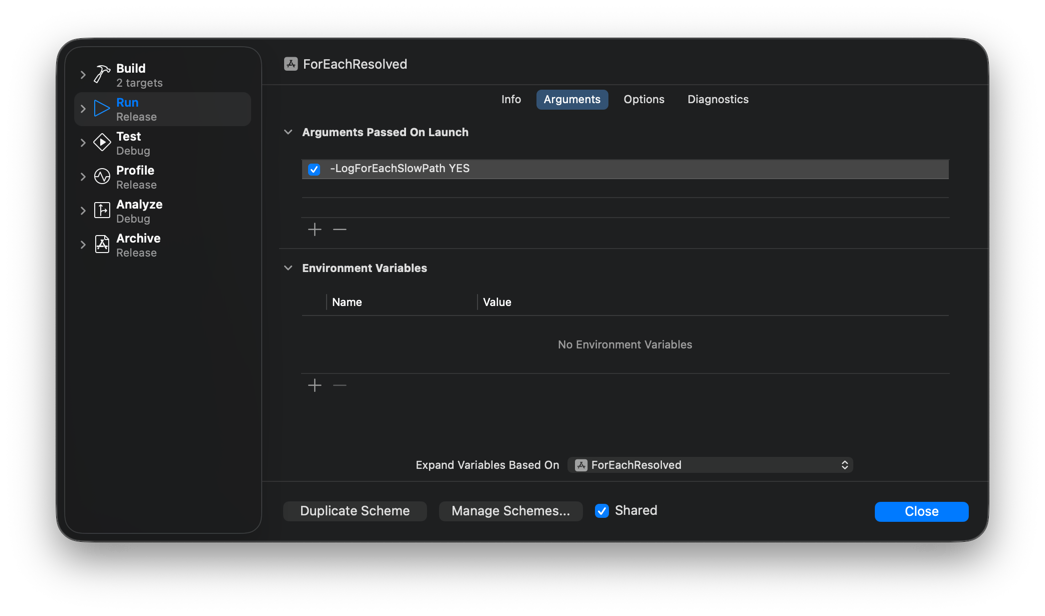
With this argument enabled, SwiftUI logs a message in Xcode's debug console when it encounters a ForEach whose content produces a non-constant number of views per element in a lazy container.
For example, filtering elements with a condition inside the ForEach content closure triggers this diagnostic:
List {
    ForEach(conversations) { conversation in
        if !conversation.isArchived {
            NavigationLink(conversation.title) {
                ChatView(messages: conversation.messages)
                    .navigationTitle(conversation.title)
            }
        }
    }
}
Diagnostic
Unable to determine number of views per element in the collection Array<Conversation>. If this view only produces one view per element in the collection, consider wrapping views in a VStack to take the fast path.
The condition makes each element produce either one row or no rows. To determine all row identifiers upfront, SwiftUI must evaluate the content closure for every element, including those whose rows are offscreen.
Although the diagnostic suggests wrapping the content in a VStack, placing a stack around the condition would retain an empty row for each excluded element. When the intention is to omit elements entirely, we should instead filter the collection before passing it to ForEach.
List {
    ForEach(activeConversations) { conversation in
        NavigationLink(conversation.title) {
            ChatView(messages: conversation.messages)
                .navigationTitle(conversation.title)
        }
    }
}
With one row per element, SwiftUI can determine the row identifiers without evaluating every content closure, and the collection no longer triggers the diagnostic.
SwiftUI also reports a variable view count when the content closure always produces a view and conditionally adds another:
ScrollView {
    LazyVStack {
        ForEach(messages) { message in
            if let date = message.dayHeading {
                Text(date, format: .dateTime.month().day().year())
            }
            Text(message.text)
        }
    }
}
Diagnostic
Unable to determine number of views per element in the collection Array<Message>. If this view only produces one view per element in the collection, consider wrapping views in a VStack to take the fast path.
Lazy stacks use indices to access their subviews, so they need to determine how many views each preceding element contributes. When that count depends on a condition, SwiftUI must evaluate the content to resolve it. Changes to the condition can then affect the indices of later subviews, which means the views containing conditional content may need to remain alive even after scrolling offscreen.
When the intention is to keep all elements and vary the content within them, we can follow the diagnostic's suggestion and introduce a stack. Wrapping the content in a VStack gives the lazy container one subview per element, while allowing the inner stack to contain a variable number of views:
ScrollView {
    LazyVStack {
        ForEach(messages) { message in
            VStack {
                if let date = message.dayHeading {
                    Text(date, format: .dateTime.month().day().year())
                }
                Text(message.text)
            }
        }
    }
}
Grouping the content gives the lazy stack a constant view count per element and removes the diagnostic, but it also introduces a layout container, so the stack we choose should match the intended arrangement.
For more guidance on building performant lists, including stable identity, efficient identifier access, and view structure, see Maximizing the performance of dynamic lists in my book The SwiftUI Way. This section is available as a free sample to read online or download.
Work with SwiftUI. Not against it.$35
A field guide to SwiftUI patterns and anti-patterns
The SwiftUI Way
- Avoid common SwiftUI pitfalls
- Build deeper intuition for the framework
- Gain insights from a former SwiftUI Engineer at Apple
Work with SwiftUI. Not against it.
A field guide to SwiftUI patterns and anti-patterns
The SwiftUI Way