

New SwiftUI APIs for reordering and drag and drop on iOS 27
Before iOS 27, the native drag-to-reorder experience in SwiftUI was limited to rows inside a List using the onMove(perform:) modifier. Other containers could participate in drag and drop with draggable(_:) and dropDestination(for:), but implementing reordering in a LazyVStack, a LazyVGrid, or a custom layout required us to manage the interaction ourselves.
iOS 27 introduces new reordering APIs that work with any container. We can mark dynamic content with reorderable() and define the scope of the interaction with reorderContainer(for:). SwiftUI handles the drag preview, insertion placeholder, and drop animation, while our code applies the resulting change to the model.
SwiftUI's drag container APIs are also now available on iPhone and iPad, after previously being limited to macOS. They let us make items in a collection draggable without making the collection reorderable, and include multiple selected items in the same drag. The APIs also support lazy generation of transferable values and drag-session observation.
# Reordering items in a single collection
Reordering in a single container requires two modifiers used together. First, we have to add reorderable() to a DynamicViewContent, such as ForEach, to mark its views as participants. Then we need to apply reorderContainer(for:) to the enclosing container to define the scope of the interaction and receive the result when a drag ends.
struct CardsView: View {
    @State private var cards: [Card] = [
        Card(id: "blue", color: .blue),
        Card(id: "green", color: .green),
        Card(id: "yellow", color: .yellow),
        Card(id: "orange", color: .orange),
        Card(id: "pink", color: .pink)
    ]

    var body: some View {
        ScrollView {
            VStack {
                ForEach(cards) { card in
                    CardView(card: card)
                }
                .reorderable()
            }
            .reorderContainer(for: Card.self) { difference in
                // Apply the mutation to the collection
            }
        }
    }
}
The reorderContainer(for:) modifier used in our example expects the item type to conform to Identifiable, but we can use reorderContainer(for:itemID:) instead if our model is not Identifiable or if we want to provide a different property to serve as the ID.
The trailing closure of reorderContainer(for:) receives a ReorderDifference value that describes what moved and where it should be inserted. The sources property of ReorderDifference contains the IDs of the items being moved, while the destination property describes where they should be inserted.
To apply the change to our collection, we can write an extension on Array following the approach from Apple's sample project for this feature, and call it from the closure.
extension Array {
    mutating func apply<CollectionID: Hashable & Sendable>(
        difference: ReorderDifference<Element.ID, CollectionID>
    ) where Element: Identifiable, Element.ID: Sendable {
        guard let sourceIndex = firstIndex(
            where: { $0.id == difference.sources[0] }
        ) else { return }

        let movedElement = remove(at: sourceIndex)

        let destination: Int

        switch difference.destination.position {
        case let .before(value):
            guard let index = firstIndex(where: { $0.id == value })
            else { return }

            destination = index

        case .end:
            destination = endIndex
        }

        insert(movedElement, at: destination)
    }
}
struct CardsView: View {
    ...

    var body: some View {
        ScrollView {
            VStack {
               ...
            }
            .reorderContainer(for: Card.self) { difference in
                cards.apply(difference: difference)
            }
        }
    }
}
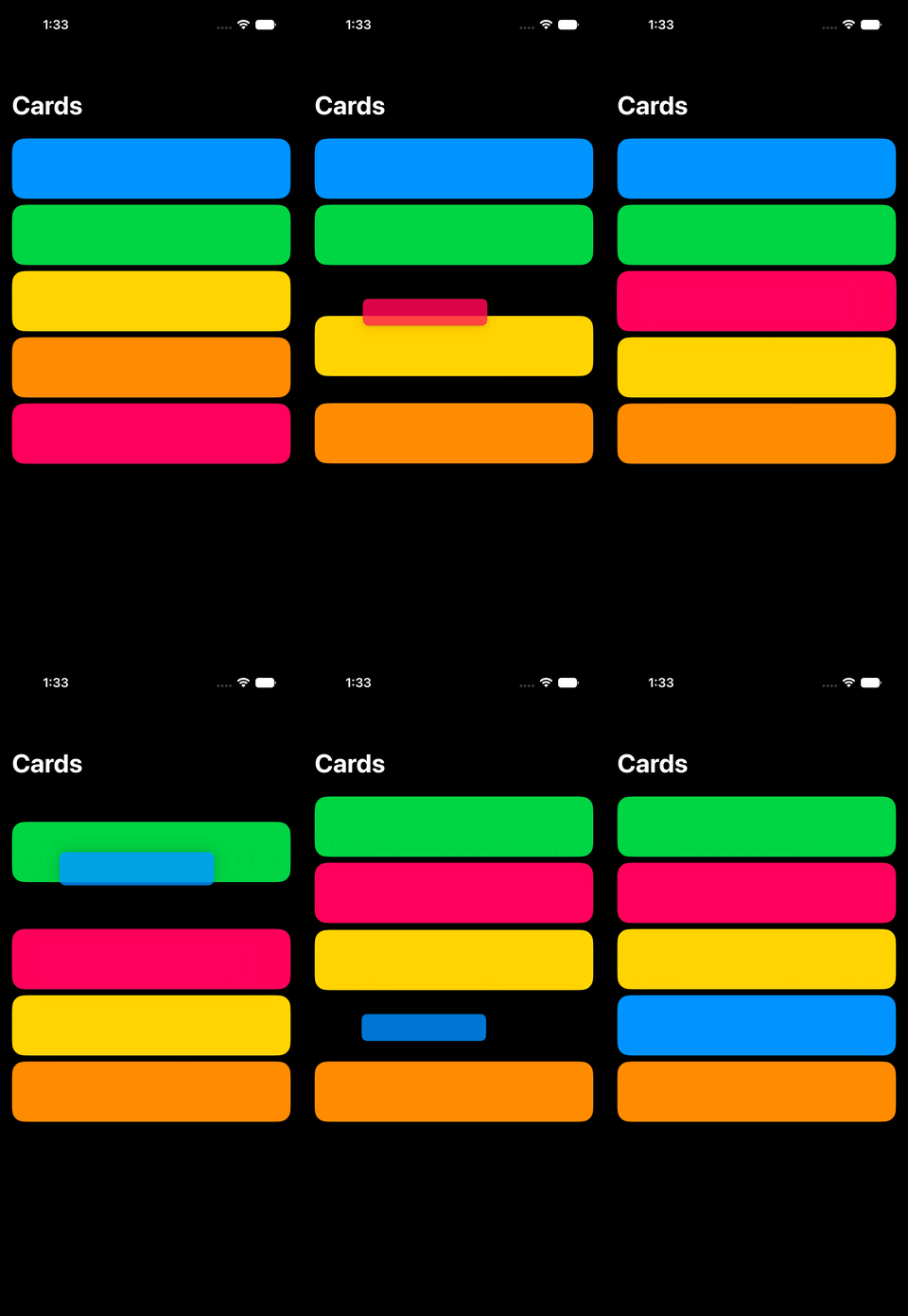
With this implementation in place, the system handles the drag affordance, the placeholder, and the drop animation automatically.
# Moving items between collections
When a container holds multiple collections of reorderable items, we need to tag each group of items with a collection identifier, and tell SwiftUI which collection received the drop when a drag ends. We can do this by passing a collection identifier to reorderable(collectionID:), and by using the reorderContainer(for:in:) overload on the container, where the in: parameter names the collection identifier type.
struct SectionedCardsView: View {
    @State private var sections: [CardSection] = [
        CardSection(
            id: "favorites",
            name: "Favorites",
            cards: [
                Card(id: "blue", color: .blue),
                Card(id: "green", color: .green),
                Card(id: "yellow", color: .yellow)
            ]
        ),
        CardSection(
            id: "others",
            name: "Others",
            cards: [
                Card(id: "orange", color: .orange),
                Card(id: "pink", color: .pink)
            ]
        )
    ]

    var body: some View {
        ScrollView {
            VStack {
                ForEach(sections) { section in
                    Section(section.name) {
                        ForEach(section.cards) { card in
                            CardView(card: card)
                        }
                        .reorderable(collectionID: section.id)
                    }
                }
            }
            .reorderContainer(
                for: Card.self,
                in: String.self
            ) { difference in
                // Apply the mutation across sections
            }
        }
    }
}
The ReorderDifference value passed to reorderContainer(for:in:) now carries two type parameters: the item ID type and the collection ID type. The destination.collectionID property identifies which section received the drop, while destination.position works the same as in the single collection case. We can use collectionID to find the destination section, remove the moved items from their current section, and insert them at the destination position.
struct SectionedCardsView: View {
    ...

    var body: some View {
        ScrollView {
            VStack {
                ...
            }
            .reorderContainer(for: Card.self, in: String.self) { difference in
                let destinationSectionID = difference.destination.collectionID

                var updatedSections = sections
                var movedCards: [Card] = []

                for index in updatedSections.indices {
                    updatedSections[index].cards.removeAll { card in
                        guard difference.sources.contains(card.id)
                        else { return false }

                        movedCards.append(card)
                        return true
                    }
                }

                guard let destinationSectionIndex = updatedSections.firstIndex(
                    where: { $0.id == destinationSectionID }
                ) else {
                    return
                }

                switch difference.destination.position {
                case let .before(cardID):
                    guard let insertionIndex = updatedSections[
                        destinationSectionIndex
                    ].cards.firstIndex(where: { $0.id == cardID }) else {
                        return
                    }

                    updatedSections[destinationSectionIndex].cards.insert(
                        contentsOf: movedCards,
                        at: insertionIndex
                    )

                case .end:
                    updatedSections[destinationSectionIndex].cards.append(
                        contentsOf: movedCards
                    )
                }

                sections = updatedSections
            }
        }
    }
}
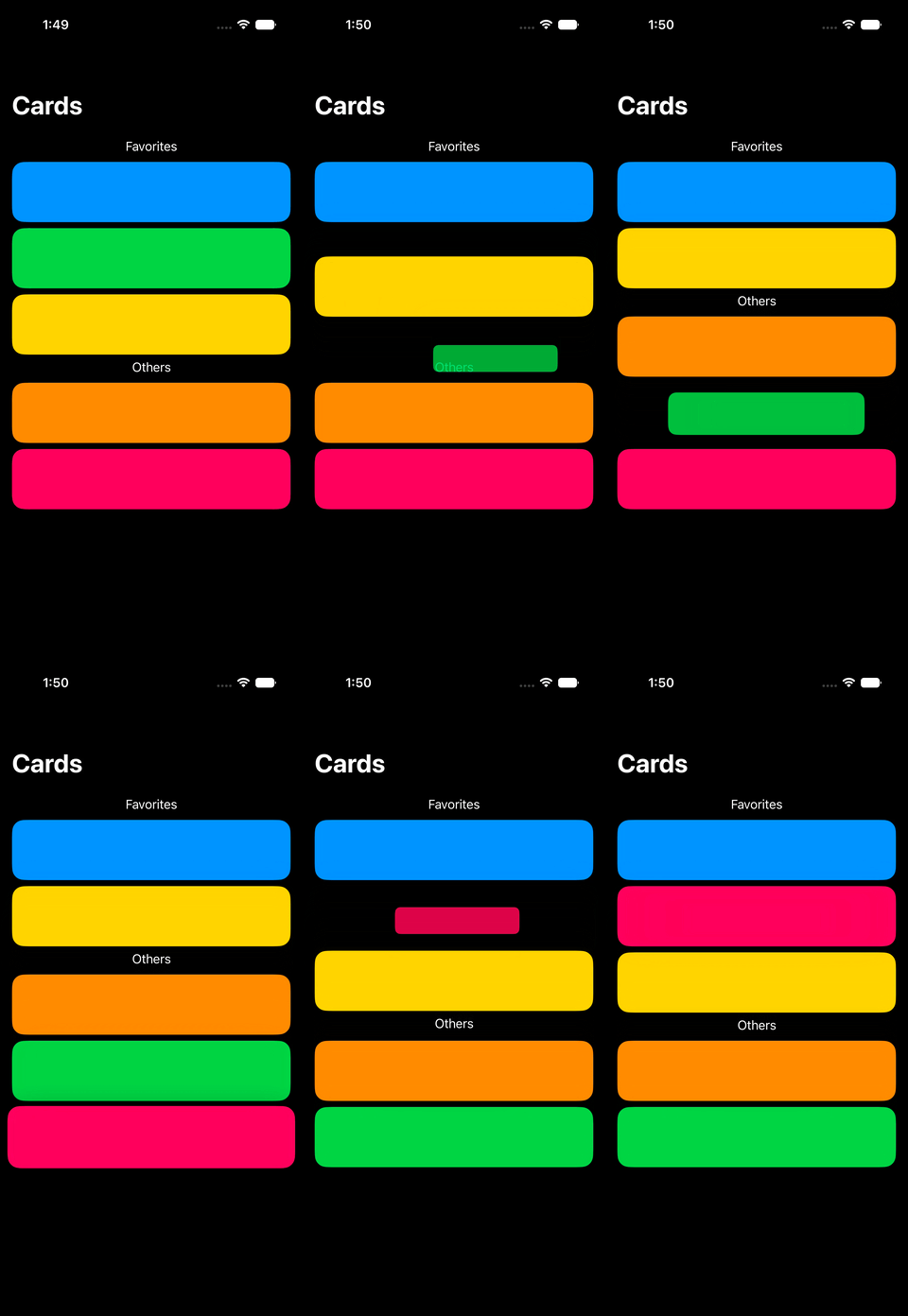
The system handles the drag affordance, the placeholder, and the drop animation automatically, whether the card is dropped within the same section or into a different one.
# Multi-item drag and drop
The reordering APIs update the order of items in a collection when a drag ends, but we can also make collection items draggable without making the collection itself reorderable. The drag container APIs let us provide the values for these items and include multiple selected items in the same drag. The values have to conform to Transferable so they can be loaded by the drop destination.
In the following example, users can select several cards and drag them together from the grid to the drop area below it. Dropping the cards displays them in the destination while leaving the original grid unchanged.
struct DraggableCardsView: View {
    let cards: [Card]

    @State private var selectedCardIDs: Set<Card.ID> = []
    @State private var droppedCards: [Card] = []

    var body: some View {
        ScrollView {
            VStack {
                LazyVGrid(columns: [GridItem(.adaptive(minimum: 120))]) {
                    ForEach(cards) { card in
                        CardView(card: card)
                            .draggable(containerItemID: card.id)
                            .onTapGesture {
                                toggleSelection(of: card)
                            }
                    }
                }
                .dragContainer(for: Card.self) { draggedCardIDs in
                    cards.filter { card in draggedCardIDs.contains(card.id) }
                }
                .dragContainerSelection(
                    cards.filter { selectedCardIDs.contains($0.id) }.map(\.id)
                )

                DroppedCardsView(cards: droppedCards)
                    .dropDestination(for: Card.self) { cards, session in
                        droppedCards = cards
                        selectedCardIDs.removeAll()
                    }
            }
        }
    }
}
To define the drag source, we mark each card with draggable(containerItemID:) and apply dragContainer(for:) to the enclosing grid. We also pass the selected card IDs to dragContainerSelection(_:), which means that starting a drag from one selected card includes the rest of the selection.
When the transfer data is requested, the dragContainer(for:) closure receives the IDs included in the drag and returns their current Card values from the model. At the other end of the interaction, the existing dropDestination(for:isEnabled:action:) modifier loads those values and passes them to its action together with a DropSession.
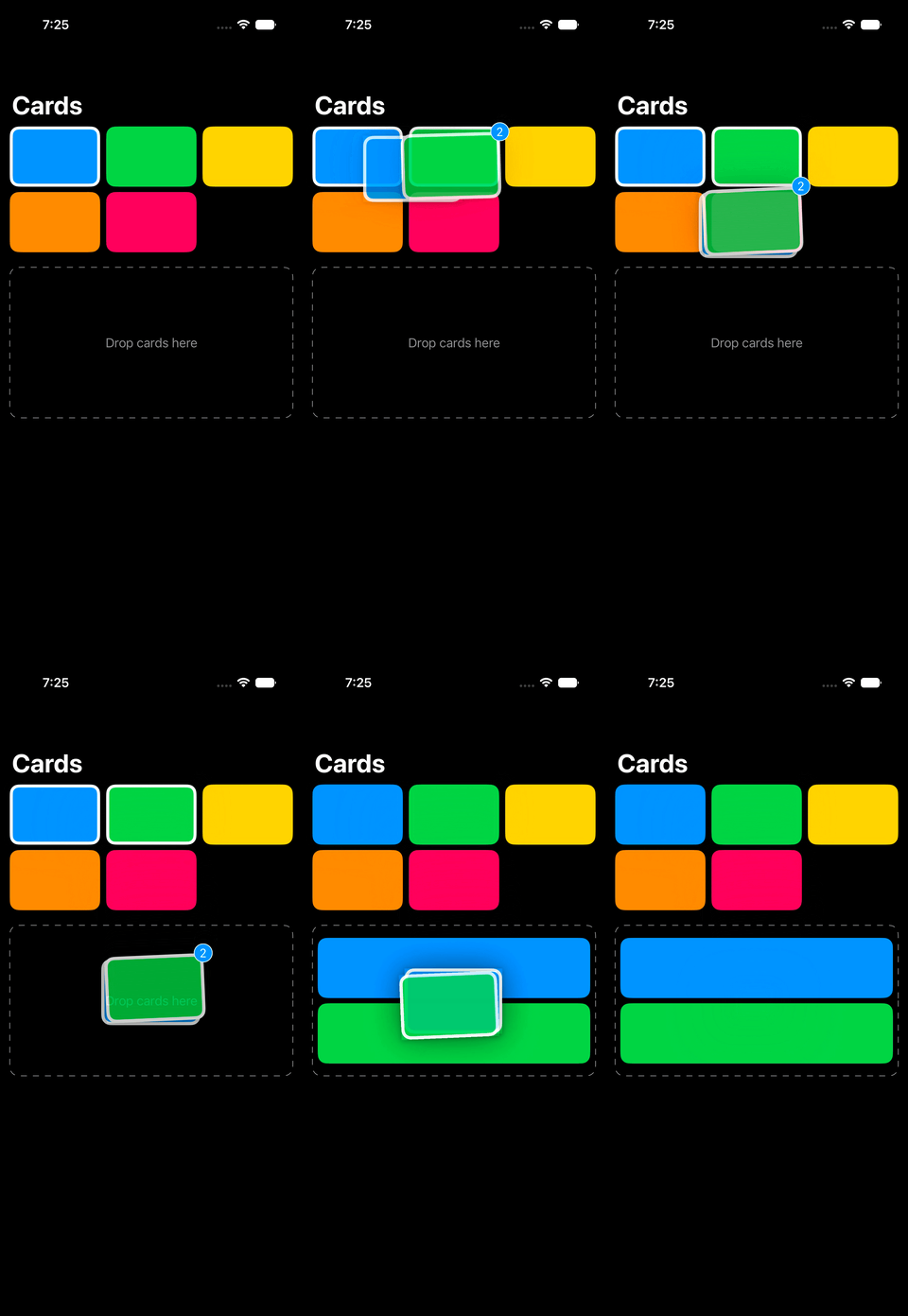
We can observe the drag phase using onDragSessionUpdated(_:) where the closure receives a DragSession whenever the drag session updates. In addition to the phase, DragSession provides the current location, the index of the dragged item, and the IDs included in the drag through draggedItemIDs(for:). We can use these values to update other parts of the interface while the drag is active or react when the transfer completes.
With the new reordering and drag container APIs, stacks, grids, and custom layouts can now support the same kinds of native drag interactions that previously required custom coordination code.
If you are looking to build a strong foundation in SwiftUI, my book SwiftUI Fundamentals takes a deep dive into the framework's core principles and APIs to help you understand how it works under the hood and how to use it effectively in your projects. And my more recent book The SwiftUI Way helps you adopt recommended patterns, avoid common pitfalls, and use SwiftUI's native tools appropriately to work with the framework rather than against it.
For more resources on Swift and SwiftUI, check out my other books and book bundles.


Work with SwiftUI. Not against it.$35
A field guide to SwiftUI patterns and anti-patterns
The SwiftUI Way
- Avoid common SwiftUI pitfalls
- Build deeper intuition for the framework
- Gain insights from a former SwiftUI Engineer at Apple
Work with SwiftUI. Not against it.
A field guide to SwiftUI patterns and anti-patterns
The SwiftUI Way