

Keeping canvas interactions responsive with frame reprojection
Within our app, Exsto, users can create complicated drawings made up of thousands, tens of thousands, or even hundreds of thousands of overlapping strokes. We render every stroke on the GPU as a quadratic Bézier curve, which can make it difficult for an iPad or iPhone to maintain a stable frame rate while the user zooms, rotates or translates the canvas.
To keep the canvas in sync with the user's gesture, we reproject the most recently GPU-rendered canvas state while the GPU produces an updated offscreen rendering of the canvas.
# Reprojecting the existing frame
Within Exsto, we represent the canvas's current projection with a transform matrix that maps canvas space to screen space. The matrix translates, rotates and scales the canvas from its origin into the current view, and gestures update it.
When the GPU completes an offscreen rendering of the canvas, we store the result to the CAMetalLayer for display along with the canvas transform used to render it.
func canvasToViewTransformDidChange() {
    let delta = renderedCanvasToViewTransform.inverted()
        .concatenating(currentCanvasToViewTransform)

    canvasLayer.setAffineTransform(delta)
    requestRender()
}
When a gesture updates the transform, we invert the previous render-time transform and concatenate the new current transform to produce a delta transform. Applying that delta moves, scales and rotates the previous GPU-rendered canvas state so it is positioned to align with the expected output for the apps current trasnform.
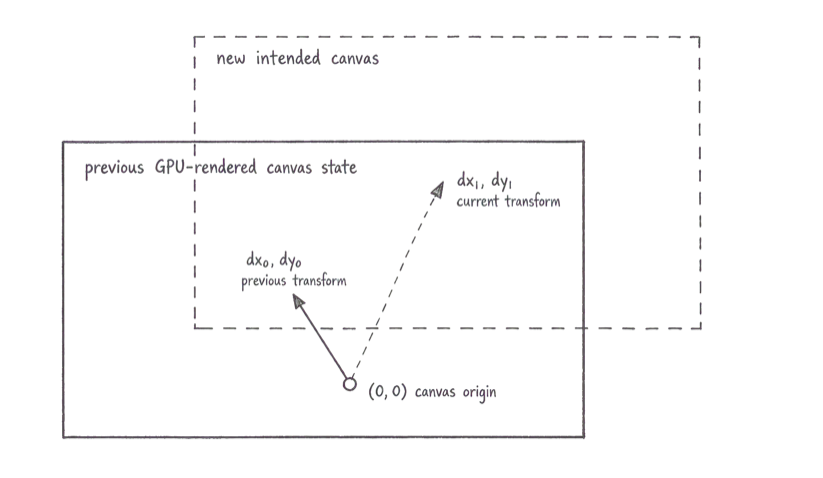
This is the simplest case: a translation. We can think of the inversion and concatenation as returning to the original canvas location from (dx₀, dy₀), then following the new transform to (dx₁, dy₁), just as in a standard vector operation.
# Requesting and handeling new rendered state
Alongside reprojecting the previous rendered state, we dispatch a request for a new rendered state using the current canvas-to-view transform.
let request = RenderRequest(
    canvasToViewTransform: currentCanvasToViewTransform
)

renderer.render(request)
Depending on the user's device and the complexity of their creation, producing this new rendered state can take a while.
Rendering proceeds asynchronously from the user's updates, so while the GPU computes it, the user may continue to translate, rotate and scale the canvas.
To avoid an infinitely long queue of requested results, if a request is already in flight and another is queued, dispatching a new request discards the queued request and replaces it with the new one.
The render process takes time and, during a gesture, the user will almost certainly make further updates to the current transform before the previous request completes. When the newly rendered result arrives, its transform will therefore be out of date.
func display(_ frame: RenderedFrame) {
    renderedCanvasToViewTransform = frame.canvasToViewTransform

    let delta = renderedCanvasToViewTransform.inverted()
        .concatenating(currentCanvasToViewTransform)

    canvasLayer.setAffineTransform(delta)
    canvasLayer.display(frame.texture)
}
Before displaying the newly rendered result, we apply the same transform inversion and concatenation to correct its out-of-date transform for the current canvas state. If the current canvas transform has not changed the inversion and concatenation produces an empty delta: an identity matrix that has no effect on the canvasLayer.
# Rendering beyond the viewport
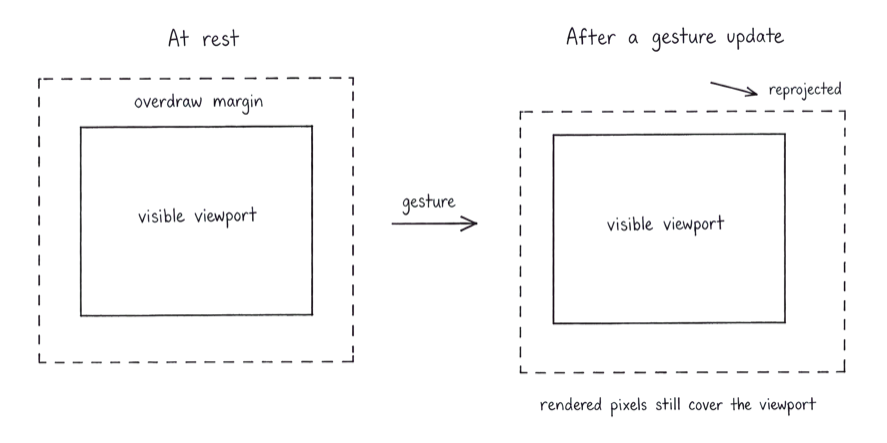
We move the previous rendered state immediately when the user starts a gesture. By rendering a small overdraw margin beyond each edge of the visible area, the user will normally not see the edge of the image. By the time the gesture has moved far enough to exhaust that margin, an updated rendered state with a new overdraw margin will usually be available.
let overdrawFactor = 1.1

let renderSize = CGSize(
    width: viewport.width * overdrawFactor,
    height: viewport.height * overdrawFactor
)
Since our transforms are based on the view's centre rather than a leading origin. We can adjust the overdraw margins simply by increasing the Metal render size, without any transform adjustments needed.
Coordinating layer updates with CATransaction
When we originally shipped Exsto, we rendered offscreen with Metal, converted the result to a CIImage, and displayed it directly in a CALayer. That approach had a significant performance cost because it required creating an image format the CPU could read. Later improvements avoided that cost by using a CAMetalLayer. When using a CAMetalLayer, it is important to enable its presentsWithTransaction property; otherwise, it uses its own presentation logic and the visual udpate will not algine with our transformation.
canvasLayer.presentsWithTransaction = true
When the offscreen renderer completes, its result is blitted into an MTLTexture target provided by the CAMetalLayer within a Core Animation transaction. This keeps the transform and image data updates in lockstep.
CATransaction.begin()
CATransaction.setDisableActions(true)

renderedCanvasToViewTransform = frame.canvasToViewTransform

let delta = renderedCanvasToViewTransform.inverted()
    .concatenating(currentCanvasToViewTransform)

canvasLayer.setAffineTransform(delta)
canvasLayer.present(frame.texture)

CATransaction.commit()
# Disabling MSAA during active gestures
We ordinarily enable multisample antialiasing (MSAA) when rendering our quadratic Bézier curves, producing crisp visual output. During an active gesture, that additional work is often wasted because the user cannot perceive it while in motion. Disabling multisampling for these intermediate results lets us provide faster feedback.
let request = RenderRequest(
    canvasToViewTransform: currentCanvasToViewTransform,
    usesMultisampling: !isTransformGestureActive
)
Each submitted request indicates whether it should use multisampling. Because we retain only one queued request, the multisampled request submitted when the gesture ends replaces any queued intermediate, non-multisampled request. It therefore becomes the next request to render as soon as the request already in flight completes, returning the canvas to full quality as quickly as possible.
func transformGestureDidEnd() {
    guard !isAnyTransformGestureActive else { return }

    isTransformGestureActive = false
    requestRender()
}
Level up your Swift skills!$35
100+ tips to take your Swift code to the next level
Swift Gems
- Advanced Swift techniques for experienced developers bypassing basic tutorials
- Curated, actionable tips ready for immediate integration into any Swift project
- Strategies to improve code quality, structure, and performance across all platforms
Level up your Swift skills!
100+ tips to take your Swift code to the next level
Swift Gems