

Responding to geometry changes in SwiftUI
As iOS apps become fully resizable, their interfaces can receive many more combinations of width and height than a fixed set of device sizes and orientations. iPad apps can be freely resized in the windowing environment, and iPhone-only apps built with the iOS 27 SDK can also be resized while running on iPad or in iPhone Mirroring on Mac. Layout decisions therefore need to reflect the space currently available to the interface rather than assumptions about the device displaying it.
SwiftUI provides several tools for building this kind of adaptation. Size classes describe broad categories, ViewThatFits selects the first alternative that fits, containerRelativeFrame() sizes content in relation to a container and custom Layout types can measure and place a group of views together.
When an interface needs to derive its own value from a view's resolved geometry, we can use onGeometryChange(for:of:action:). The value can be based on the view's size, its safe-area insets or its frame in a coordinate space, allowing the response to follow a geometric rule specific to the interface.
For example, we can use the available size to choose how a card arranges its content. When the window is narrow and taller than it is wide, the card places the artwork above the details. When the window is wider than it is tall, the same content moves into a horizontal arrangement.
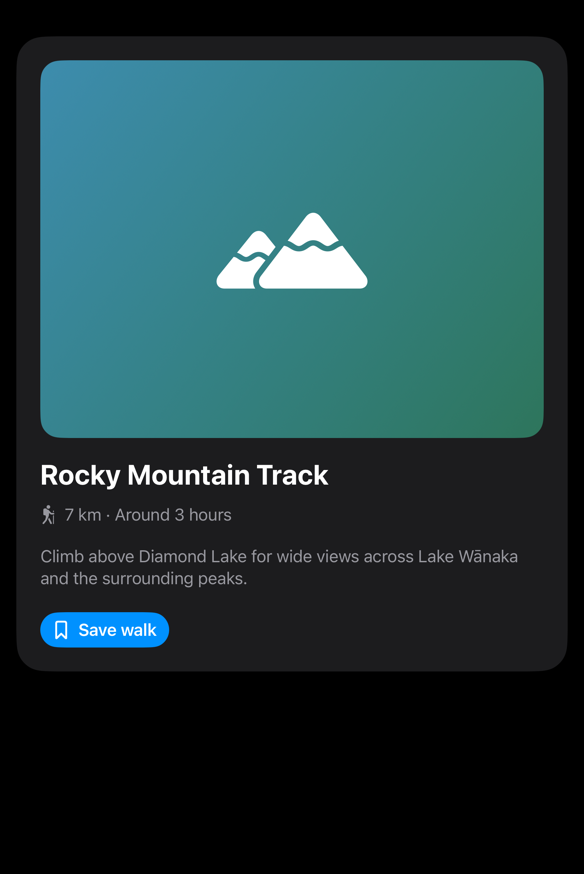
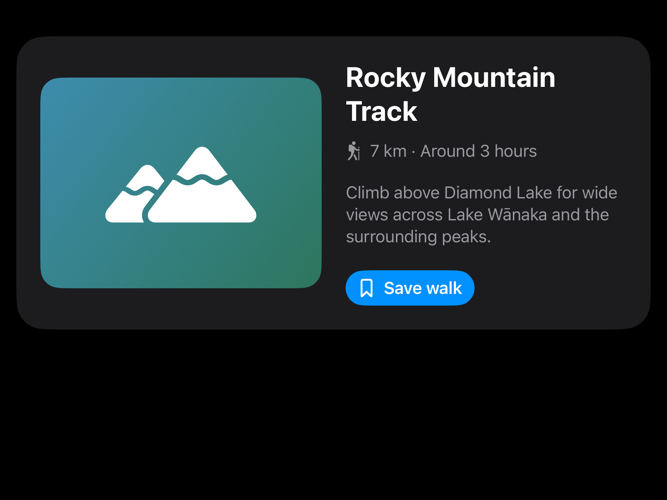
The relationship between width and height is not the only part of the rule. A taller-than-wide window can still provide enough horizontal space for the content, so the card can keep its horizontal arrangement.

We can achieve this adaptive behavior with onGeometryChange() by deriving the appropriate arrangement from the available size and storing the result in a state property:
struct ContentView: View {
    let verticalLayoutWidthThreshold: CGFloat

    @State private var usesVerticalLayout = true

    var body: some View {
        ScrollView {
            AdaptiveCard(
                usesVerticalLayout: usesVerticalLayout
            )
            .padding()
        }
        .onGeometryChange(for: Bool.self) { geometry in
            let size = geometry.size

            return size.height > size.width
                && size.width < verticalLayoutWidthThreshold
        } action: { usesVerticalLayout in
            self.usesVerticalLayout = usesVerticalLayout
        }
    }
}
In this example, we apply onGeometryChange() to the ScrollView, whose size represents the space available to the card. The first closure, called the transform closure, receives a GeometryProxy and uses its size to determine whether the card should use its vertical arrangement. Because the closure returns a Boolean, we pass Bool.self to the for argument. The action closure receives the result and assigns it to usesVerticalLayout, which AdaptiveCard uses to choose its arrangement.
As the geometry changes, SwiftUI reevaluates the transform closure but only calls the action when the returned Boolean differs from the previous result. A window can pass through many intermediate sizes during a resize without changing the appropriate arrangement, so the action is not called for every measurement.
Returning only the information needed for the response can help prevent frequent geometry changes from producing unnecessary state updates. It is also important to make sure that the state updated by the action remains independent of the geometry used to derive that value. Otherwise, changing the state can alter the layout and produce another measurement, leading to repeated updates between layout and state.
Used carefully, onGeometryChange() can be a helpful tool for building adaptive interfaces. It gives us a way to respond to the space currently available according to the particular requirements of an interface, even when those requirements cannot be easily expressed with more specialized APIs.
If you are looking to build a strong foundation in SwiftUI, my book SwiftUI Fundamentals takes a deep dive into the framework's core principles and APIs to help you understand how it works under the hood and how to use it effectively in your projects. And my new book The SwiftUI Way helps you adopt recommended patterns, avoid common pitfalls, and use SwiftUI's native tools appropriately to work with the framework rather than against it.
For more resources on Swift and SwiftUI, check out my other books and book bundles.


Work with SwiftUI. Not against it.$35
A field guide to SwiftUI patterns and anti-patterns
The SwiftUI Way
- Avoid common SwiftUI pitfalls
- Build deeper intuition for the framework
- Gain insights from a former SwiftUI Engineer at Apple
Work with SwiftUI. Not against it.
A field guide to SwiftUI patterns and anti-patterns
The SwiftUI Way