

Building adaptive SwiftUI layouts with containerRelativeFrame()
With iOS 27 approaching, making sure our apps are ready to resize is an important part of preparing for the release. It's also a good opportunity to look more closely at SwiftUI's adaptive-layout APIs and the different problems each one is designed to solve.
I recently wrote about responding to geometry changes in SwiftUI with onGeometryChange(). That modifier is useful when an interface needs to derive a value from its resolved geometry. In this post, I want to focus on another API: containerRelativeFrame(). It provides a more direct solution when the requirement is simply to size a view in relation to its container. We can express that relationship as part of the layout without observing geometry or storing measurements in state.
Depending on the relationship a view needs to have with its container, we can choose from three containerRelativeFrame() overloads. A view can fill the available width or height, occupy a chosen number of equal portions, or calculate a custom length from the container size. In each case, SwiftUI finds the nearest supported container, such as a window, navigation or tab container, or scroll view, and uses the space it provides after accounting for safe-area insets.
# Matching a container dimension
The most direct form of container-relative sizing makes a view match its container along one or more axes. Its first parameter accepts an Axis.Set, where we pass .horizontal to use the available width, .vertical to use the available height, or [.horizontal, .vertical] to match both dimensions.
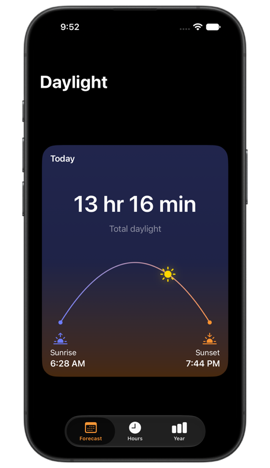
For example, we can present a series of cards in a horizontal scroll view, with each card matching the width of its visible content area.
struct DaysView: View {
    var body: some View {
        let pageMargin: CGFloat = 20

        ScrollView(.horizontal) {
            HStack(spacing: pageMargin) {
                ForEach(dayForecasts) { forecast in
                    DayForecastCard(forecast: forecast)
                        .containerRelativeFrame(.horizontal)
                }
            }
        }
        .contentMargins(.horizontal, pageMargin)
    }
}
The HStack isn't a supported container for relative sizing, so SwiftUI continues up the view hierarchy and uses the surrounding ScrollView. Its horizontal content margins are removed from the available width, allowing every card to fill the visible content area while preserving space at both edges. Because we only pass the horizontal axis to containerRelativeFrame(), the card can determine its own height from its content or aspect ratio.

# Dividing a container into equal portions
Matching an entire container dimension works well when one view should fill the available space, but some layouts need to keep several items visible at once. The count-and-span overload of containerRelativeFrame() divides the selected dimension into equal portions. The count parameter defines the total number of portions, while span determines how many of them the modified view occupies.
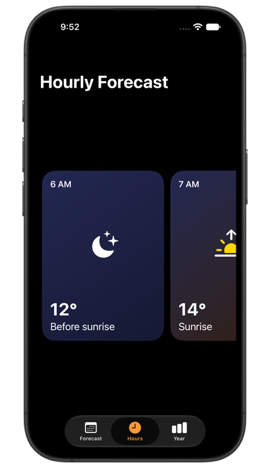
The overload also requires a spacing value so that SwiftUI can account for the gaps between portions when calculating their size. It doesn't add the spacing itself, so we need to pass the same value to the container that arranges the views. In this horizontal hourly forecast, each card spans two of the three available portions.
struct HoursView: View {
    var body: some View {
        let spacing: CGFloat = 12

        ScrollView(.horizontal) {
            LazyHStack(spacing: spacing) {
                ForEach(hourForecasts) { forecast in
                    HourForecastCard(forecast: forecast)
                        .containerRelativeFrame(
                            .horizontal,
                            count: 3,
                            span: 2,
                            spacing: spacing
                        )
                }
            }
        }
        .contentMargins(.horizontal, 20)
    }
}
SwiftUI first accounts for the spacing between the three portions and then divides the remaining horizontal space equally. Giving each card a span of two makes it wider than half of the visible content area while leaving part of the following card on screen. As the scroll view changes width, SwiftUI recalculates the portions and the cards resize with it.

# Calculating a custom relative size
The first two overloads express predefined relationships with the container, either matching a dimension or dividing it into equal portions. When a layout needs a different sizing rule, the closure-based overload lets us calculate the frame length ourselves. The closure receives the available container length and the axis currently being resolved, and the value it returns becomes the view's length on that axis.
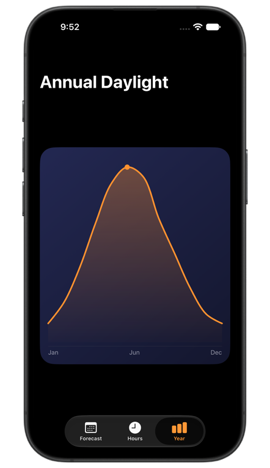
A proportional height can be useful for content such as a chart that should occupy a consistent share of the available space without relying on a fixed value. In this example, the annual daylight chart takes 68 percent of the vertical space provided by the navigation container.
struct YearView: View {
    var body: some View {
        NavigationStack {
            AnnualDaylightChart()
                .containerRelativeFrame(.vertical) { length, _ in
                    length * 0.68
                }
                .padding(.horizontal)
                .frame(maxHeight: .infinity)
                .navigationTitle("Annual Daylight")
        }
    }
}
Because we only request a relative frame on the vertical axis, the closure is evaluated for that axis alone and its second parameter isn't needed here. The chart keeps its own horizontal sizing, while its height follows changes to the space available in the NavigationStack. The outer flexible frame centers the chart within that space without changing the relative height calculated by containerRelativeFrame().

Taken together, the overloads of containerRelativeFrame() make it a flexible building block for resizable interfaces. They support both common and custom relationships to the available space while allowing dimensions we don't select to continue participating normally in SwiftUI layout. This focused role distinguishes the modifier from onGeometryChange(), which is intended for cases where resolved geometry needs to produce a separate value or drive behavior.
If you are looking to build a strong foundation in SwiftUI, my book SwiftUI Fundamentals takes a deep dive into the framework's core principles and APIs to help you understand how it works under the hood and how to use it effectively in your projects. And my more recent book The SwiftUI Way helps you adopt recommended patterns, avoid common pitfalls, and use SwiftUI's native tools appropriately to work with the framework rather than against it.
For more resources on Swift and SwiftUI, check out my other books and book bundles.


Work with SwiftUI. Not against it.$35
A field guide to SwiftUI patterns and anti-patterns
The SwiftUI Way
- Avoid common SwiftUI pitfalls
- Build deeper intuition for the framework
- Gain insights from a former SwiftUI Engineer at Apple
Work with SwiftUI. Not against it.
A field guide to SwiftUI patterns and anti-patterns
The SwiftUI Way